Name a target. Set an amount. Drop the overlay into OBS. From that point on, every tip adds to the running total - across all your platforms at once. Fansly, OnlyFans, Chaturbate, Camsoda and Stripchat feed into one single bar. Visible to the whole stream, in real time. When the goal is reached, the next one in your queue activates automatically. The simplest collective mechanic in streaming, with real cross-platform power.
The TipDeck Goal is an OBS overlay showing a cross-platform progress bar that fills on viewer tips from all your platforms at once. Unlike the native goal on Chaturbate, Fansly, or OnlyFans - which only counts tips from that one platform - TipDeck pools Fansly, OnlyFans, Chaturbate, Camsoda and Stripchat into one single bar. You define the goal (label, target, mode), activate it, and every tip from every linked platform moves the bar. Queue multiple goals for the night - when one is reached, the next auto-activates.
A fundraising-style progress bar for live streams - except viewers tip real money instead of donating, the bar fills in real time on screen, and you queue as many goals as you need for the night. Every tip moves the bar. Every viewer can see it move. And unlike native platform goals, TipDeck pools all five platforms into one single bar - Fansly, OnlyFans, Chaturbate, Camsoda and Stripchat all contribute to the same goal together.
The concept is universal - progress bars appear in every fundraising campaign, game telethon, and charity stream for a reason. Humans find incomplete things harder to ignore than completed ones, and a bar with a named target is one of the simplest visual prompts ever devised to drive participation. The TipDeck Goal puts that mechanic directly into your OBS scene, driven by real tips from your actual audience.
Mechanically, it's an OBS browser source. Log into TipDeck, create a goal preset, activate it, copy the URL, paste it into OBS, and the bar is live. Every tip on your linked platforms - Fansly, OnlyFans, Chaturbate, Camsoda, Stripchat - registers instantly and moves the bar. No spreadsheets, no manual tracking, no "how much have we raised so far?" - the overlay answers that question continuously for everyone watching.
The Goal runs in one of two modes, and choosing the right one changes how viewers engage:
Amount mode tracks cumulative USD since the goal started. Every tip - any size, any platform - adds its USD value to the running total. Target is a dollar amount (e.g. "$200 tonight"). This is the most natural mode for most streams: it's transparent, every tip counts, and bigger tips have more visible impact.
Count mode tracks the number of tips that exactly match a qualifying value. For example, "20 tips of $5" - each $5 tip increments the counter by 1, regardless of other tips. Count mode is useful when you want to encourage a specific tip amount repeatedly, or when you want the goal to be more community-oriented - 20 viewers doing $5 each rather than one viewer doing $100.
Streamers who want a clear, structured session use the Goal as the backbone of the night: "We're going to $200 and then the bonus show happens." The bar sets expectations, measures progress, and converts ambient watching into purposeful tipping. Creators who run multiple shows per stream use the queue to chain goals back to back - each goal is a milestone, each milestone is a celebration. Streamers who prefer a minimal overlay footprint use the Discreet style: a 3px line at the bottom of the scene that fills without dominating the layout.
Six things happen between a viewer's tip and the next goal activating automatically. Six steps, every time, no exceptions. Knowing them turns the Goal from a passive bar into a tool you can steer.
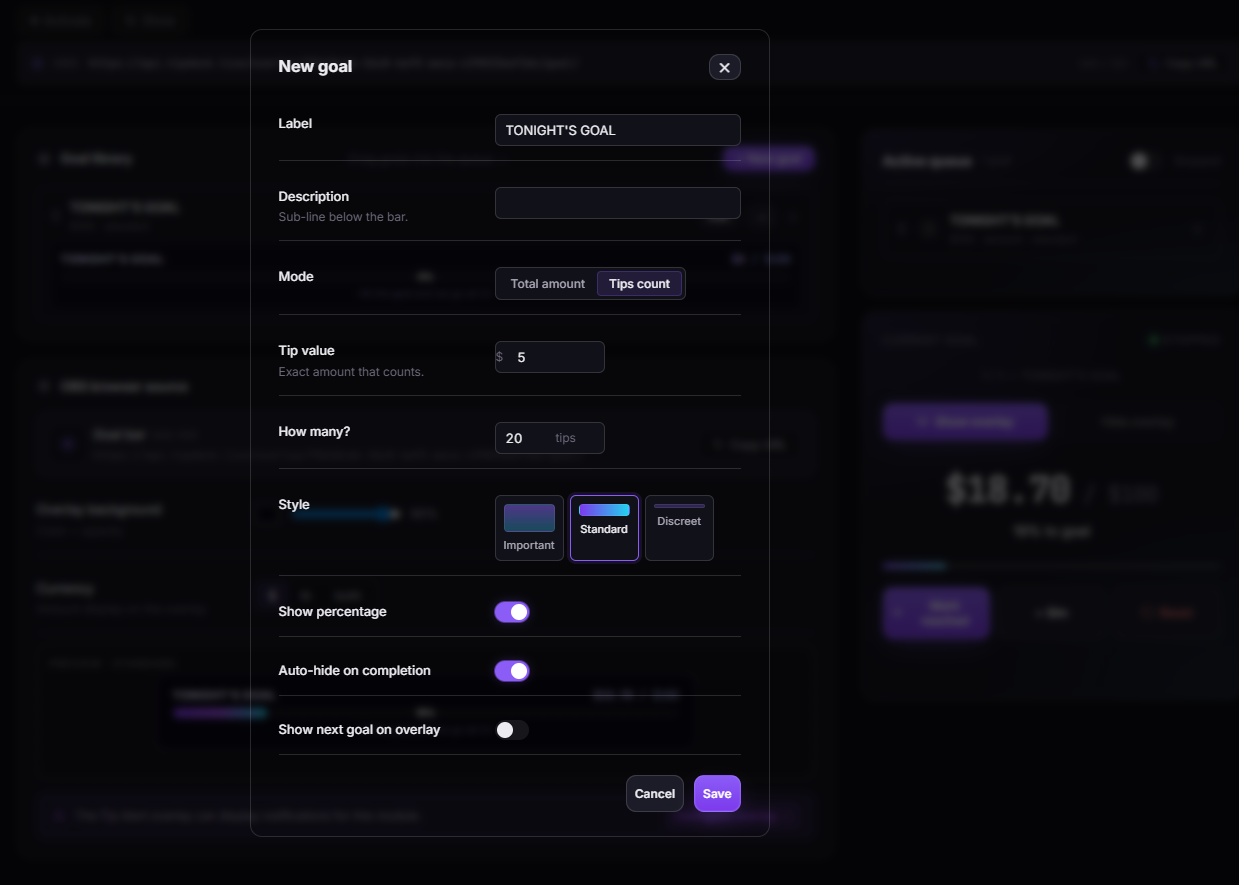
From the dashboard, you name the goal (e.g. "TONIGHT'S GOAL", "BONUS SHOW", "COSTUME CHANGE"), pick the mode (amount or count), set the target (e.g. $200, or 20 tips of $5), and choose a bar style (Standard, Important, or Discreet). Save it as a preset so you can reuse it in future streams without re-entering the settings.
Add presets to the queue in the order you want them to appear during the stream. Activate the first goal. The overlay immediately starts showing the bar - at zero if it's a fresh session, or at the accumulated amount if you're continuing from an earlier session.
In amount mode, every tip on any linked platform adds its USD value to the running total. A $20 tip moves the bar by $20 ÷ target × 100%. In count mode, only tips that exactly match the qualifying value increment the counter. A $10 tip on a "20 × $5" goal does not count - the qualifying amount must match exactly (within $0.01 for token conversions). The bar updates on the overlay within a second of each tip registering.
The progress bar grows continuously as tips arrive. If show_pct is on, the percentage is displayed inside the bar. The label and current amount are always visible. If show_next_goal is on, a preview line at the bottom shows the next queued goal - creating anticipation before the current one is even reached.
When the progress bar reaches 100%, the goal_reached event fires. The overlay shows a brief celebration. If auto_hide is on, the overlay disappears after the celebration - useful if you want a clean scene while you perform the goal reward. The goal is logged permanently in the dashboard history.
If there's a next goal in the queue, it activates immediately after the celebration. The bar resets to zero with the new goal label and target. No dashboard interaction required during the stream - the queue handles the transitions. If you want a pause between goals (to acknowledge viewers, announce the next reward), you can pause the queue and advance it manually when you're ready.
Ninety seconds of the Goal in action: tips arrive, bar fills, goal reached, next goal activates. The fastest way to understand how the queue transitions work is to watch two full cycles back to back.
Once the video drops, the player above swaps to the embedded clip - same frame, same dimensions, no layout shift.
No inflated statistics. Here is the precise behavioural mechanism behind why a named progress bar outperforms a verbal tip request - six reasons, each grounded in observable human behaviour.
A blank tip button asks viewers to spend money for abstract appreciation. A named goal - "TONIGHT'S GOAL: $200" - converts that same ask into participation in a mission with a defined endpoint. The name matters: viewers tip toward something they can picture, not toward a number. That psychological shift from "spending" to "contributing" is the core of why goal bars work.
When a viewer tips $20 and the bar visibly jumps 10%, they can measure their contribution to the group effort. That visible impact - "I moved the bar" - is a form of social recognition that a private tip notification never provides. Viewers who can see their impact tip again. Viewers who feel invisible don't.
Without a structure, a stream drifts - energy peaks and troughs with no clear shape. A queue of three or four goals gives the night milestones: viewers know roughly what to expect and when. That structure keeps regulars in the stream longer because there's always a next milestone to tip toward. The queue isn't just a convenience feature - it's a retention mechanism.
When viewers can see "Next: BONUS SHOW · $150" while the current goal is still filling, they start planning their next tip before the current one closes. The preview extends engagement forward into the next cycle - anticipation fires before the current reward even lands. That forward momentum is what separates a structured stream from a series of isolated tip moments.
When the bar hits 100%, everyone watching experiences it simultaneously. Unlike a spin wheel where one viewer's tip triggers a personal spin, a completed goal is a collective achievement. The whole room contributed. The whole room celebrates. That shared excitement is qualitatively different from any individual tip acknowledgement, and it's what makes viewers come back to streams that use goals regularly.
Some streams are visually dense - camera, multiple overlay elements, chat. A Standard bar competes for space. The Discreet style is a 3px line that communicates the goal's progress without occupying visual real estate. Viewers who know to look for it see it; viewers who don't notice it still benefit from the psychological pressure of a goal existing. One overlay, two contexts, same tipping mechanic.
One preset, one queue, one URL in OBS. Below is exactly what each setting does - reference this section when you want to tweak a goal mid-stream or set up the queue before going live.
Each preset defines one goal. A preset has:
Save multiple presets per account. Presets are reusable across streams - "FRIDAY NIGHT GOAL" can be reused every Friday without re-entering the settings.
Three visual styles, each suited for a different scene layout:
Three toggles that change what the overlay shows and when:
The overlay can display progress in USD only, tokens only, or both. In token economies (Chaturbate, Stripchat), displaying both is often clearest for viewers - "1240 tokens / $200" makes the conversion visible. TipDeck converts token tips to USD automatically at your configured token rate; the currency display is purely cosmetic and does not affect how tips are counted.
Add presets to the queue in the order you want them to appear. The queue can hold unlimited presets. By default, it auto-advances when a goal is reached - the next goal activates without any dashboard interaction. If you want manual control:
You can also reorder goals in the queue mid-stream, insert a new preset, or remove the next goal without affecting the currently active one. Queue changes take effect at the next transition, not on the current goal.
The questions creators actually ask in our Discord, with straight answers.
A Goal overlay is an OBS browser source showing a named progress bar. Viewers tip and the bar fills toward a target - a cumulative USD amount or a number of qualifying tips. When the goal is reached, a celebration fires and the next queued goal activates automatically.
It's the standard fundraising-bar mechanic, built specifically for tip-driven live streams on adult platforms. The core value is visibility: the bar tells the whole room how close the goal is at all times, so the streamer doesn't have to say a word.
Yes - all five. TipDeck reads tips from your linked platform chats via a Chrome extension, converts token tips to USD at your configured rate, and credits every tip toward the active goal. From the overlay's perspective, a tip on Chaturbate and a tip on Fansly are identical events - both move the bar.
If you multistream, tips from all active platforms aggregate into a single goal bar. A $10 tip from Stripchat and a $5 tip from OnlyFans both count toward the same running total.
Amount mode tracks cumulative USD tipped since the goal started. Every tip adds its dollar value. A $20 tip moves the bar by $20. Good for goals where the total revenue matters (e.g. "reach $200 tonight for the bonus show").
Count mode tracks the number of tips that match a qualifying value exactly (within $0.01). If your goal is "20 × $5", only $5 tips increment the counter - a $10 tip does not count as two $5 tips, and a $6 tip does not count at all. Count mode is useful when you want to drive a specific tip amount and create a sense of community participation ("we need 15 more people to do $5").
Yes. Save as many presets as you need and add them to the queue in any order. The queue holds unlimited presets. When the active goal is reached, the queue advances to the next one automatically - no dashboard interaction needed during the stream.
You can reorder the queue, add presets mid-stream, or pause the auto-advance to make manual transitions. Changes to the queue take effect at the next transition; they don't affect the currently active goal.
The goal_reached event fires. The overlay shows a brief celebration animation. Then one of two things happens depending on your settings:
If there's a next goal in the queue, it activates automatically (or on manual advance if you've paused the queue). The bar resets to zero with the new goal label and target.
Yes - that's the entire design. The overlay is a browser source in your OBS scene, visible to everyone watching the stream live. Viewers see the bar fill in real time as tips arrive. They don't need access to your dashboard, your chat, or any separate tool.
The overlay displays the goal label, current progress, target amount, and optional percentage. Everything a viewer needs to understand the goal and decide whether to tip is on screen continuously.
The Discreet style renders the goal as a 3px line across the bottom of the overlay at 1920×80. The goal label appears in small text adjacent to the line, and the line fills from left to right as tips arrive.
Use it when: your scene is already visually dense, you have multiple overlays competing for space, or you want the goal to be present without it dominating the visual hierarchy. Some experienced streamers use Discreet for their warm-up goals and switch to Standard or Important for the main goal of the night.
TipDeck has a 15-day free trial with full access to every game including the Goal - no credit card required. After the trial it's a flat monthly subscription with no per-tip cut, no usage caps, no upsells. The free trial includes unlimited presets, all three bar styles, and the full queue system.
The Goal is one of nine TipDeck games. Try them all on the 15-day free trial - no card, no commitment, cancel from the dashboard whenever you want.