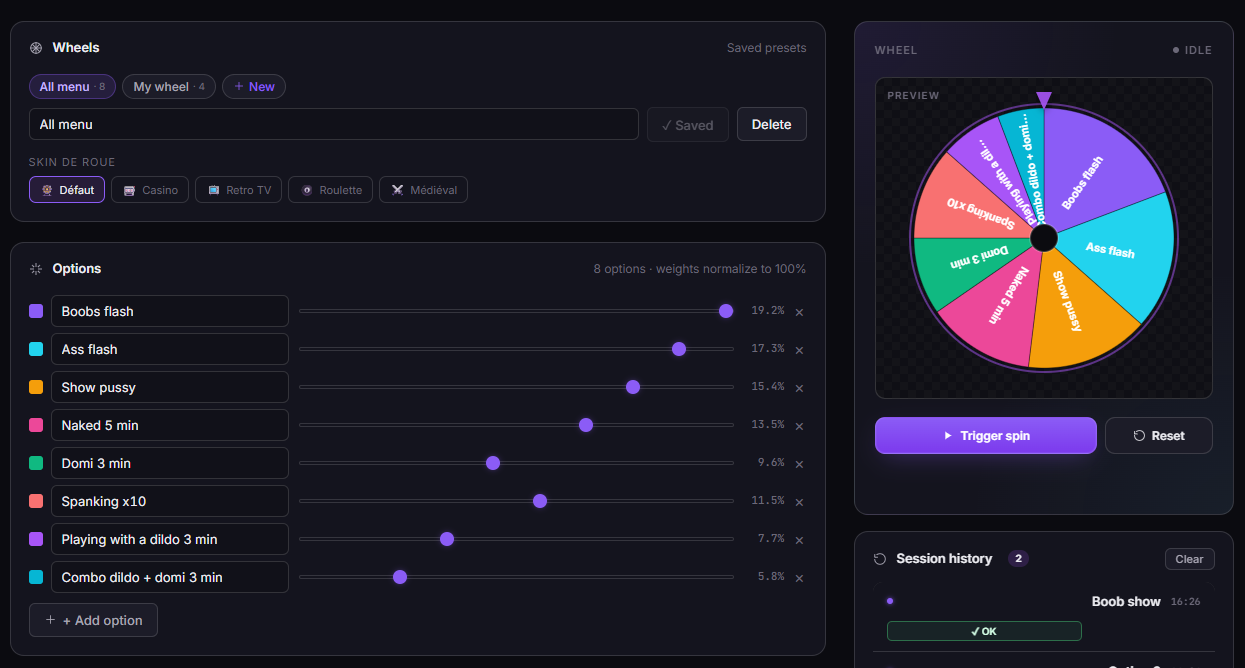
Define eight slices. Pick a trigger amount. Drop the overlay into OBS. From that point on, every time a viewer tips, the wheel spins — live, on screen, in front of everyone — and lands on a slice you control. The casino-style mini-game your stream has been missing.
The TipDeck Wheel is an OBS overlay that spins on viewer tips. You define the slices (rewards, actions, punishments, prizes), set how much a tip needs to be to trigger a spin, and the overlay does the rest — live, animated, in front of the whole stream. Every spin is visible, every result is public, and viewers tip to make things happen. Works on Fansly, OnlyFans, Chaturbate, Camsoda and Stripchat from a single dashboard.
A wheel of fortune for live streams — except every spin is paid for by a viewer tip, every result is visible to the whole room, and every outcome is something you defined ahead of time. It's the oldest game in the world, dropped into the most interactive medium that exists.
If you've ever watched a game show, you already know how it looks. The wheel has eight slices (or as many as you want — eight is the sweet spot for readability). Each slice carries a label: a small action, a reward, a punishment, a prize, a wild card. A viewer tips, the wheel spins, the pointer lands on a slice, the streamer does what the slice says. The whole thing takes about six seconds — long enough to build suspense, short enough to keep the stream moving.
Mechanically, it's an OBS browser source. You don't install anything heavy: you log into your TipDeck dashboard, define your slices, copy a URL, paste it into OBS as a Browser Source, and the overlay shows up in your scene. From there, every tip on your linked platforms — Fansly, OnlyFans, Chaturbate, Camsoda, Stripchat — is read in real time and feeds the wheel. Nothing happens behind the scenes the viewers can't see. Transparency is the whole point: if the spin isn't visible, the tip isn't rewarded.
Twitch and YouTube creators have used wheel overlays for years, usually driven by channel points or bits. Those wheels are useful but they have a structural problem: the currency is fake. Channel points cost nothing to earn and viewers feel no friction when they spin. The wheel becomes background noise.
A TipDeck Wheel runs on real money. A viewer who tips $5 to spin the wheel has decided, in that moment, that they want a specific outcome more than they want $5. That changes the energy of the spin — for the tipper, for the streamer, for everyone watching. The wheel is no longer ambient decoration; it's the engine of the stream.
Creators on adult platforms use it for tip-menu replacement (the wheel becomes the menu, randomised). Solo streamers use it during slow chat moments to inject momentum. Couples and group streams use it as a forcing function — if the wheel lands on it, you can't back out. New streamers use it as a conversation starter ("first $5 tip picks the next slice"). Veteran streamers use it as a closing-window tactic in the final 20 minutes when energy needs a third wind.
The common thread isn't the audience or the platform. It's that you have a moment of live attention and you want to convert it into a tip without asking for one directly. The wheel does the asking for you.
Six things happen between a viewer's tip and the streamer doing what the wheel says. Six steps, every time, no exceptions. Knowing them turns the Wheel from "a thing that sits in OBS" into a tool you can steer.
Any tip, on any platform you've linked to TipDeck, lands in the dashboard within roughly a second. The viewer's name, the amount, and the platform are all captured. No manual entry, no copy-paste, no "I missed it" excuses.
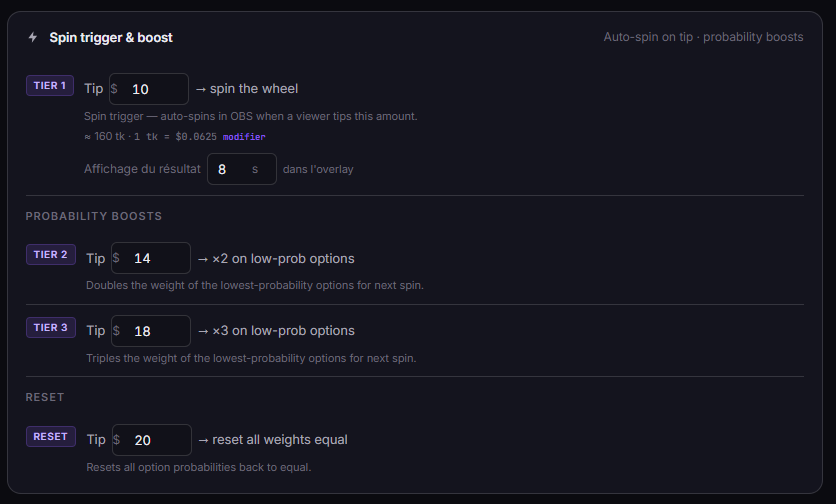
This is the rule everyone gets wrong the first time. The Wheel doesn't react to "any tip that crosses a threshold". It reacts to exact-match tier amounts you defined in the dashboard (with a $0.01 tolerance for token conversions). Four tiers, listed here in priority order if a tip somehow matches more than one:
A $7 tip? Nothing fires. A $4.99 tip? Nothing fires. A $10.00 tip? Boost ×2 triggers, weights shift, the wheel spins on the new weights. Tiers are exact-match by design — anything else would let viewers exploit the rounding.
The overlay animates a real spin — a long acceleration, a slow decel, a satisfying click as the pointer crosses each slice. The tipper's name appears next to the wheel: "@jakek_88 spins". Other viewers see exactly who paid, what they paid, and what they're betting on. That visibility is half the game.
The result is determined the instant the tip is registered — the animation is just the show. Slices have weights from 1 to 10, so rare rewards stay rare: a slice with weight 1 has half the chance of a slice with weight 2. Configure weights to balance "fun and frequent" against "rare and crazy".
If a Boost tip preceded this spin, the weights have already been modified — and the modifications stay. Weight changes are persisted to your preset, spin after spin, until someone tips the Reset amount. That's how the Wheel gets gradually more generous over a session, then snaps back when a $25 reset lands.
The slice the wheel landed on stays visible for a few seconds. The result is added to a public history feed at the side of the overlay so late-joining viewers can see what's happened tonight. The dashboard also keeps a permanent log — every spin, every result, every tipper, queryable later.
This is the part no software can do for you. The wheel landed on the slice you defined, in front of the viewers who paid for the spin. Following through is the contract. If you set "Dance" as a slice, you dance. The wheel only works long-term if the room trusts that the result is real.
Ninety seconds of the Wheel in action: tip arrives, overlay spins, slice lands, streamer reacts. The fastest way to understand the mechanic is to watch one full cycle from outside the dashboard.
Once the video drops, the player above swaps to the embedded clip — same frame, same dimensions, no layout shift.
We're not going to throw a fake percentage at you. What we will tell you is the precise mechanism: why the Wheel shifts viewer behaviour. Five reasons, all backed by behavioural science older than streaming itself.
The classic slot-machine result: random rewards generate more engagement than predictable ones. A flat tip menu ("$5 = compliment") is predictable. A wheel that might land on a compliment, a tease, a wild card, or a boost is unpredictable — and humans are wired to keep playing unpredictable games. This isn't manipulative; it's structural. The wheel makes the same dollar feel like a different transaction.
When a viewer sees another viewer's tip trigger a visible spin, the door cracks open. Lurkers who would never tip first will tip second. The Wheel makes tipping contagious in a way no static donation goal ever does — because every spin is a small public event, not a private transaction.
The six seconds between "tip lands" and "pointer stops" are where the value compounds. The tipper feels suspense, the room feels suspense, the streamer reacts in real time. None of that exists with a flat tip menu. The Wheel is one of the few interactive mechanics that turns the process of tipping into entertainment.
A weight-1 slice in a wheel of weight-25 slices lands maybe 1 in 25 spins. Viewers chase the rare slice — the BOOST×2, the MYSTERY, the wild card. The chase generates spins that would never happen with a deterministic menu. Calibrate weights and you get to choose how often that chase resolves.
A $10 tip doesn't trigger a second spin; it triggers a Boost ×2, shifting the weights of the under-represented slices upward. A $20 tip is a Boost ×3 — a stronger shift. A $25 tip is a full Reset. Big tippers aren't paying for repetition, they're paying for influence over the game itself. The whole room sees the wheel react — visibly — and so do they. That's a different psychological transaction, and a much rarer one in tip culture.
Streams die in the dead spots. Slow chat, low energy, you running out of things to say. A wheel of fortune in the corner of the scene is something to look at, even when nothing is spinning — and a single new tip restarts the engine. The Wheel is also a streamer's safety net.
One pass through the dashboard, one paste into OBS, and the wheel is live. Below is exactly what you'll touch and what each setting does — bookmark the section if you want a single reference for "how do I tweak X".
Each slice is a label (max 18 characters displayed), a weight from 1 to 10, and — in the Default skin — a custom color. Minimum 2 slices, no hard cap on the upper end. Eight is the design sweet spot: readable on a 1080p scene, easy to memorise, balanced rotation. Beyond twelve and labels start to overlap; below six and the wheel feels under-utilised.
A solid starter wheel for an adult-platform stream:
Total weight 18. The Wild card lands roughly 1 in 18 spins (~5.5%) — rare enough to feel like a moment, frequent enough to keep viewers hopeful. Tip a Boost tier and that probability shifts upward; tip a Reset and it snaps back.
Up to four tier amounts per preset. Each has a default value, all are editable, and a tip only fires a tier if its amount matches exactly (within $0.01 to handle token-to-USD conversions). Anything that isn't an exact match does nothing — there's no "accumulate to threshold" logic.
The two Boost tiers don't multiply spins — they modify the slice weights, nudging any slice below the average weight upward. Formula: w + (avg − w) × 0.3 for Boost ×2, × 0.6 for Boost ×3. The Reset tier snaps every weight back to the average. Weight changes accumulate across spins until a Reset — your wheel literally gets more generous toward rare slices as the night goes on, then resets when a $25 tip lands.
Priority order if a tip happens to match multiple tiers: Reset > Boost ×3 > Boost ×2 > Spin. The Boost and Reset tiers are only visible in the dashboard when your weights are uneven — a uniform wheel has nothing to boost.
Tier calibration by platform:
The Wheel ships with five SVG-rendered themes. They change colors, fonts and decorative elements — the underlying mechanics stay identical. Switch from the dashboard; the live overlay updates instantly via a wheel_update event, no OBS source reload needed.
In Casino, Retro, Roulette and Médiéval, the per-slice color setting is overridden — the skin's palette wins so the theme stays coherent.
A preset bundles its own slices, weights, skin, tier amounts, and winner-display duration. Save as many as you want — only one is "active" at any given moment. Switching the active preset from the dashboard fires wheel_update and the live overlay rebuilds in milliseconds.
The typical workflow: a Warmup wheel (tame slices, low tier amounts) at the start of stream, switch to a Late-night wheel mid-session, finish with a Whale-bait wheel in the last twenty minutes. Three presets, three different game phases, zero downtime.
The overlay starts in display: none. It only appears when a spin fires — by design, so the wheel stays an event rather than wallpaper. Per-spin animation sequence:
One Browser Source, one URL, one set of dimensions:
The overlay is fully transparent between spins, so the browser source doesn't compete with your camera or other scene elements when nothing is happening.
The questions creators actually ask in our Discord, with straight answers.
Yes — all five. TipDeck reads tips from your linked chats via a Chrome extension, normalises the amount to USD (token tips use your configured token-to-USD rate), and feeds it to the wheel. From the Wheel's perspective, a $5 tip on Chaturbate and a $5 tip on Fansly are the same event.
If you multistream, the Wheel aggregates tips from every platform you're live on into a single overlay. An exact-match $5 tip triggers a spin regardless of which platform fired it.
Yes. Every slice has its own weight from 1 to 10. A slice with weight 10 has 10× the chance of landing compared to a slice with weight 1. The math is fully transparent — the dashboard shows you the resulting percentage for every slice as you tune.
The only thing weights cannot do is guarantee a specific outcome. Even at weight 1 in a wheel of 100, that slice will eventually land. If you want a slice to never land, remove it from the wheel.
They modify the weights of your slices — they don't multiply spins.
Boost ×2 (default $10) and Boost ×3 (default $20) nudge any slice with a weight below the wheel's average toward the average. Formula: w + (avg − w) × 0.3 for ×2, × 0.6 for ×3. The under-represented slices get a meaningful chance bump; the heavy slices don't change.
Reset (default $25) snaps every slice back to the wheel's average weight. Wipes whatever bias the boosts have accumulated.
Weight modifications persist across spins until a Reset fires — boosts compound over a session, so your wheel becomes progressively more generous on rare slices until someone tips the Reset amount and the math snaps back.
Nothing fires. The Wheel uses exact-match tier comparison (with a $0.01 tolerance to handle token-to-USD conversions). A $7 tip on a wheel configured with $5 / $10 / $20 / $25 tiers triggers no spin, no boost, no reset — it just shows up in your chat like a regular tip.
This is by design. Approximate matching or "closest tier" logic would be exploitable (every $5.01 tip would suddenly be a Spin). Exact-match keeps the contract simple: viewers know what each tier costs, no surprises.
About 3 minutes if you already know your slices. About 10 minutes if you're brainstorming them on the spot. The pre-built starter wheels (Tame · Spicy · Wild) shortcut the brainstorm to 30 seconds — pick the template closest to your style and edit the labels.
Interactive overlays consistently outperform static streams in our user base. The Wheel works best when viewers can see other people spinning — visibility is the whole point. We don't promise a specific percentage; we hear from creators that the Wheel changes the energy of the room more than it changes the tip rate of any single viewer. Energy is what builds repeat regulars.
The streams where it doesn't work tend to share one thing: the slices aren't followed through on. The Wheel is a contract, and a broken contract kills the mechanic. If you keep the contract, the contract keeps you.
Yes. You can save unlimited wheel presets per account (Tame Wheel for warmup, Wild Wheel for late-night, Whale-Bait Wheel for boost events) and switch between them mid-stream from the dashboard. The overlay updates instantly — no OBS source reload needed.
TipDeck has a 15-day free trial with full access to every game, including the Wheel — no credit card required. After the trial it's a flat monthly subscription with no per-tip cut, no usage caps, no upsells.
The Wheel is one of nine TipDeck games. Try them all on the 15-day free trial — no card, no commitment, cancel from the dashboard whenever you want.