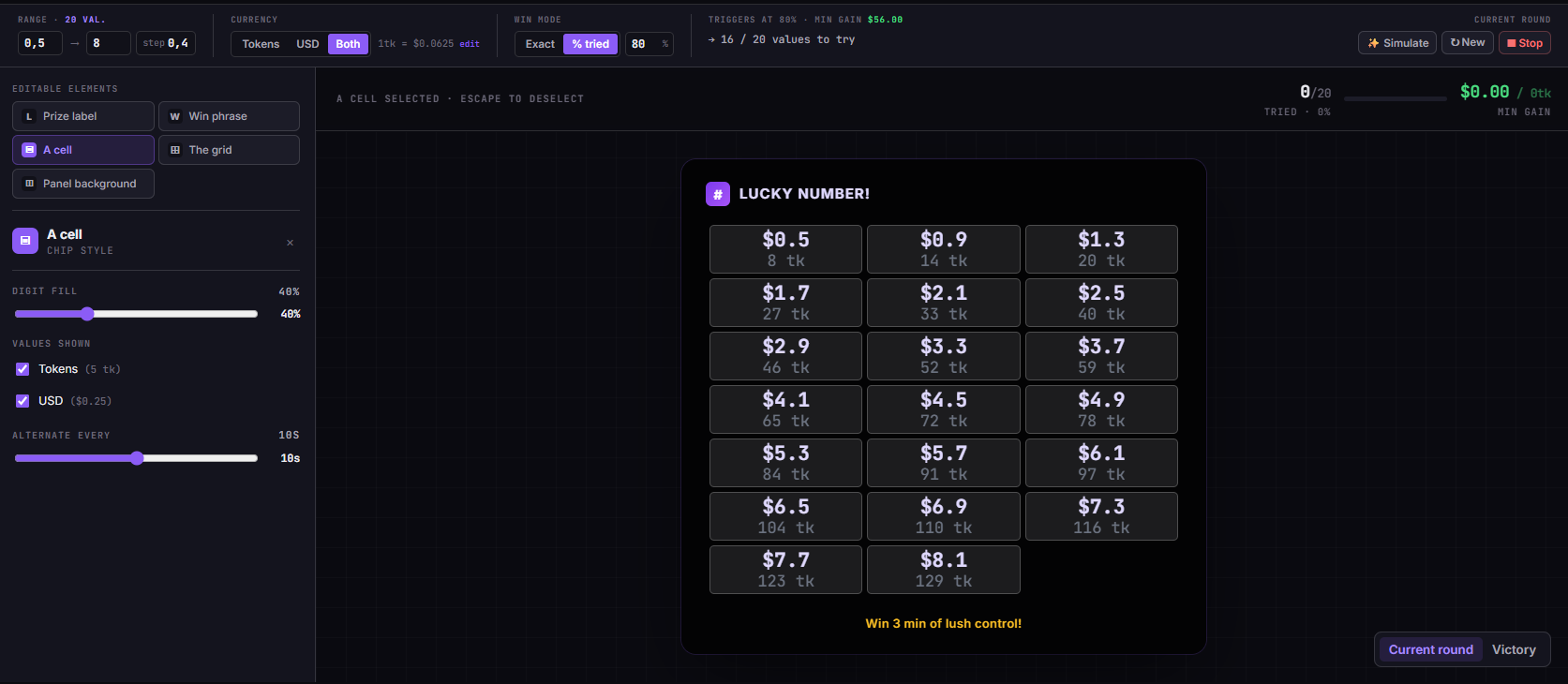
Set a number range. Hide a lucky number. Drop the overlay into OBS. From that point on, every time a viewer tips the value they want to claim, that cell is marked as tried - the chip dims out on the grid, live, in front of everyone. Whoever hits the secret number wins whatever prize you've set. Bingo mechanics, tip-driven, no host required.
The TipDeck Lucky Number is an OBS overlay that turns a value grid into a live bingo game. You set a range, viewers tip values to claim cells, and whoever hits the lucky number (or when enough cells are filled) wins. The lucky number is hidden until someone tips it - the reveal is the moment. Works on Fansly, OnlyFans, Chaturbate, Camsoda and Stripchat from a single dashboard.
Bingo meets live streaming. You put a numbered grid on screen, hide a secret value inside it, and let viewers tip to claim cells one by one. The moment someone hits the hidden number, the overlay fires the win screen. Everyone in the room sees it happen.
The concept is old - every carnival has a version of it. The TipDeck implementation is what makes it work for live streaming. You set a range (say, 1 to 50 with step 1 - that's 50 chips on the grid). Each chip is a dollar value. Viewers don't "donate"; they guess. They tip the amount they want to claim, and that chip is marked as tried - it dims out on the grid. The grid fills in real time, visible to everyone in the room.
Two win modes give you control over how the round ends. In exact mode, there's a secret lucky number known only to you - or randomized so even you don't know it. The round ends the instant a viewer tips that exact value: the overlay reveals the number and calls the winner by name. In percent mode, there is no secret number: the round ends when a set percentage of the grid has been tried, rewarding communities that tip broadly rather than chasing a single cell.
Mechanically, it's a browser source. You don't install anything on your machine - log into the TipDeck dashboard, configure the game, copy the overlay URL, paste into OBS. Every tip on every linked platform flows in automatically. The overlay handles grid state, win detection, and the win screen. You just play.
A static tip menu is a list. "$10 = compliment, $20 = dance." It's a transactional document. The Lucky Number grid is a game board. Every viewer who tips is a player. Every tried cell is a public record of who played. The grid fills in front of the whole room, building pressure toward a win that everybody wants to see. A viewer watching the grid fill doesn't see a menu - they see a game in progress, and most people who see a game in progress want to join.
Creators use it when they have a concrete prize to offer - a free show, a shoutout, custom content - and want to create a fair, visible competition for it. It works for solo streamers who want a structured game mechanic without hosting complexity, and for communities where viewers compete to be first rather than just tip the most. The grid makes every tipper a visible participant, which changes the social dynamic of the room.
Six things happen between a viewer's tip and the winner being called. Six steps, every round, no exceptions. Knowing them lets you steer the game instead of just watching it run.
In the dashboard you define min, max, and step. A range of 1 to 50 step 1 produces 50 chips. A range of 5 to 100 step 5 produces 20 chips. The grid displays up to 150 chips - above that, the overlay switches automatically to a progress bar showing the percentage tried. Currency can be tokens, USD, or both.
In exact mode: you enter a specific lucky number within the range, or click Randomize and let TipDeck pick one. The value is stored server-side and never exposed in the overlay source or network requests until someone hits it.
In percent mode: there is no hidden number. You set a coverage threshold (e.g. 80%). When 80% of the grid's unique values have been tried, the round ends and TipDeck announces the viewer whose tip crossed the threshold.
The viewer looks at the grid, picks a number they want to claim, and tips that exact dollar amount (or token equivalent). The TipDeck Chrome extension reads the tip from chat in real time and passes it to the overlay. No manual input from the streamer - it's automatic. If the amount doesn't correspond to any value in the range, it's registered as a regular tip but doesn't interact with the grid.
The chip for the tipped value dims out as tried. The tipper's name appears in the feed below the grid. The total tips counter updates. The whole room sees it simultaneously. Social dynamics kick in: viewers who haven't tipped yet see the grid shrinking, cells disappearing, and a secret number still out there unclaimed.
In exact mode: a viewer tips the lucky number. The overlay detects the match and immediately fires the win sequence. In percent mode: the coverage threshold is crossed and the overlay fires the same sequence.
Either way, the overlay transitions to the win screen: the lucky number is revealed prominently, and the win message shows the winner's handle - e.g. "@luna_m found the Lucky Number!" - using the custom message you configured.
The win screen holds on the overlay until you reset or start a new round. The tipper's name is front and center. You deliver the prize - the free show, the content, the shoutout - and start a fresh round if you want to keep the game going. Each round is independent: a new lucky number, a clean grid, same configuration.
Two minutes of the Lucky Number grid in action: tips land, cells light up, the room chases an unknown value, and the win screen fires. The fastest way to understand the mechanic is to watch one full round from outside the dashboard.
Once the video drops, the player above swaps to the embedded clip - same frame, same dimensions, no layout shift.
We're not going to throw a made-up engagement stat at you. What we'll give you is the precise mechanism: why this grid format changes what viewers do with their money. Six reasons, all structural.
The psychological frame is entirely different from a donation. The viewer is playing. They pick a number, invest in it, and watch the grid for feedback. The transaction has suspense attached to it - which a flat tip to a streamer doesn't. That shift from "gift" to "bet" changes who tips and how often, because playing a game is a different impulse from being charitable.
Every tried cell is a public record of who played. Lurkers who would never tip first can see that other viewers are actively in the game. A grid that's 40% filled is a more compelling invitation than any "please tip" announcement - it shows a game in progress that people are already invested in. That visibility makes tipping feel like joining a group, not making a solitary purchase.
Viewers don't know which cell wins. Any unclaimed cell could be it. That uncertainty keeps the game open - a viewer who tipped once might tip again on a different number because "it might be that one." In exact mode, the winner can emerge at any moment from any remaining cell, which keeps latecomers in the game until the very end.
In percent mode, every tip contributes to the win condition - including viewers who can only afford the lower values in the range. The win is collective: the round ends when the community has filled enough of the grid together. That communal dynamic creates a different kind of engagement from the individual lottery feel of exact mode. Both modes have their place depending on your audience.
The optional prize label - displayed prominently on the overlay - names what the winner actually gets. "Win a free show" is more motivating than abstract grid-filling. The prize contextualises every tip: the viewer isn't just claiming a number, they're entering a competition with a defined reward. That specificity converts passive viewers into active players.
A half-filled number grid is always something to talk about. "Cell 23 is still open, who's going for it?" "Seven cells left unclaimed." The grid gives the streamer constant material without any prep. It's ambient but active - a visual narrative that advances with every tip, whether or not the conversation is flowing naturally.
One pass through the dashboard, one paste into OBS. Below is exactly what you'll touch and what each setting does - bookmark this if you want a single reference for setup and adjustments between streams.
Three fields define your grid. min is the smallest value on the grid, max is the largest, and step is the increment between chips. Example - a range of 1 to 50 step 1 generates 50 chips, each representing one dollar.
Above 150 distinct values, the grid switches automatically to a progress bar - the percent-tried display. Ranges with a larger step keep the grid compact and individual chip value high, which works well for audiences that tip bigger amounts.
If your audience tips in tokens, you can set the range in token amounts. Example with conversion rate $0.0625/token :
Three options: tokens, USD, or both. If you select tokens or both, you also set the token-to-USD conversion rate used to normalise incoming tips. A viewer tipping 50 tokens at a rate of $0.10/token is treated as a $5 USD tip - so a grid running in USD would light up cell 5 for that tip.
Exact mode: Set a lucky_number within your configured range, or click Randomize. The lucky number is stored server-side - it never appears in the overlay source code or any client-side request. The round ends when a viewer tips that exact value. If you randomize, even you don't know the number ahead of time, which makes your on-stream reaction authentic.
Percent mode: Set a win_percent threshold (e.g. 80). When 80% of the grid's unique values have been tried at least once, the round ends. No lucky number to reveal - the win screen shows the coverage percentage and the viewer whose tip crossed the threshold.
An optional text field displayed on the overlay throughout the round. Keep it short - "Win a free show!" or "Custom video for the winner" works well. This label stays visible the entire game, reinforcing what viewers are competing for. Blank it out if you're running the grid purely for tip volume without a defined prize.
By default the grid auto-fits chips into a responsive column layout. You can override the column count for fixed grid geometry. For ranges that produce more chips than fit on one page of the 1920×1080 overlay, the grid paginates automatically - the viewer's chip is always reachable even if it's on a secondary page.
One Browser Source, one URL:
The questions creators actually ask in our Discord, with straight answers.
A Lucky Number overlay is an OBS browser source that displays a number grid on your live stream. Viewers tip the exact value they want to claim. One cell hides a secret lucky number - whoever tips it wins. It's bingo mechanics applied to live streaming tip culture. The grid fills publicly in real time; the win screen fires when the lucky number is hit or the coverage threshold is reached.
Yes - all five. TipDeck reads tips from your linked chats via a Chrome extension, normalises the amount to USD (token tips use your configured rate), and feeds it to the Lucky Number overlay. A tip on any linked platform is treated identically: if the amount matches a grid value, that chip is marked as tried - it dims on the grid.
If you multistream, tips from all active platforms flow into the same overlay. The grid state is shared regardless of which platform a tip came from.
In exact mode, the streamer sets (or randomizes) a secret lucky number. The round ends when a viewer tips exactly that value - the overlay reveals the number and announces the winner. A single viewer wins a defined moment.
In percent mode, there is no secret number. The round ends when a configured percentage of grid cells have been tried - e.g. 80% coverage. The win is effectively communal. Percent mode works better for communities where you want broad participation over a single winner mechanic.
The lucky number is stored server-side and never sent to the overlay until the win condition triggers. It doesn't appear in the overlay's HTML, JavaScript, or any network request visible in the browser dev tools. Viewers with technical knowledge cannot cheat by inspecting the page source.
Yes. In the dashboard, next to the lucky number field, there's a Randomize button. TipDeck picks a value within your configured range at random. You can re-randomize between rounds. If you randomize before the stream starts, you genuinely don't know the winning value - which makes your on-stream reaction to the win authentic and unscriptable.
The tip is registered and the tipper appears in the feed. The cell is already marked as tried, so there's no visual change to the grid. In percent mode, duplicate tries don't count toward coverage - the percentage is based on unique values tried, not total tip count. The tip still contributes to your earnings regardless.
There is no time limit. A round runs until the win condition triggers. Most streamers treat one round as the game for a full stream session. You can reset and start a new round from the dashboard at any time - new lucky number, clean grid, same configuration. Running multiple rounds per stream is common and keeps energy up if the first round resolves quickly.
TipDeck has a 15-day free trial with full access to every game, including Lucky Number - no credit card required. After the trial it's a flat monthly subscription with no per-tip cut, no usage caps, no upsells.
Lucky Number is one of nine TipDeck games. Try them all on the 15-day free trial - no card, no commitment, cancel from the dashboard whenever you want.