Home Games Hype Meter
Game · Updated May 2026

The tip bar that drains if viewers stop.

Set a reward. Pick a fill rate. Drop the overlay into OBS. From that point on, every tip pushes the gauge toward 100% - but the bar is always draining. Viewers tip to fill it faster than it empties. When it hits 100%, the reward unlocks live on screen. The urgency mechanic your stream has been missing.

2 min setup, OBS browser source 5 platforms Fansly · OF · CB · Camsoda · Stripchat 560×80 thin horizontal bar
Special show
72%
Default Bar
Special show
7/10
Hearts Row
Show
Special
72%
Thermometer
Special show
72%
Neon Glow

TL;DR - the short version

The TipDeck Hype Meter is an OBS overlay showing a fill gauge that rises on viewer tips. You set the reward text (what unlocks at 100%), the fill rate (how much each dollar fills), and a decay rate (how fast the bar drains between tips). The bar is always doing something - filling on tips, draining in silence. When it hits 100%, hype_reached fires, the overlay celebrates, and the streamer delivers. Works on Fansly, OnlyFans, Chaturbate, Camsoda and Stripchat from one dashboard.

01What is the TipDeck Hype Meter?

A thin horizontal bar in your OBS scene that fills from left to right as viewers tip - and slowly drains when they stop. The gauge has one mission: reach 100% so the reward unlocks. It's the simplest collective mechanic on stream, and the most relentless.

The concept is older than streaming. Fundraising bars, progress trackers, crowd-energy meters in arena games - humans are wired to finish things that are almost full. The Hype Meter puts that psychology directly into your stream, powered by real tips instead of audience applause.

Mechanically, it's an OBS browser source. Log into TipDeck, name your reward, set how much each dollar fills the bar, pick a decay rate, copy the overlay URL, paste it into OBS at 560×80, and you're done. From that point on, every tip on your linked platforms feeds the gauge automatically. No manual intervention, no missed tips, no "wait, how much was that?" - the bar moves in real time and the whole stream can see it.

The decay is what makes it different

Most tip goals are static: the bar fills and stays filled. The Hype Meter is different because the bar drains. The decay_rate setting - measured in %/second - means the gauge is always ticking down between tips. That single change converts a "nice to watch" bar into an active call to action. A gauge at 85% that's visibly draining is a stronger tipping prompt than a goal at 85% that's just sitting there.

The decay is public. Viewers can see the bar falling in real time. The streamer doesn't have to say a word - the bar does the asking for them.

Who runs a Hype Meter

Solo streamers use it as a background engine: set a reward that requires some effort (a show, a costume change, a specific performance), let the gauge define the pace of the stream. Couple and group streams use it as a shared objective - neither performer decides when the reward triggers, the gauge does. New streamers use it as a structural anchor to replace "tip for X" with a visible, public mechanic that doesn't require constant verbal prompting. Veteran streamers use it for high-value rewards they want to create real anticipation around - the bar builds the buildup for you.

02How the Hype Meter works - the rules

Six things happen between a viewer's first tip and the reward unlocking. Six steps, every cycle, no exceptions. Understanding each one lets you tune the mechanic precisely instead of guessing.

1

The streamer sets the reward text and fill rates

Before going live, you define the reward label that appears on the overlay (e.g. "SPECIAL SHOW", "TWERKING", "COSTUME REVEAL"). Then you set fill_per_dollar and fill_per_token - the percentage the gauge fills per unit of tip. A fill_per_dollar of 2% means it takes exactly $50 in tips to fill the bar from 0 to 100%.

2

A viewer tips - the gauge fills by fill_per_dollar × amount

Any tip on any linked platform arrives in the TipDeck dashboard within roughly a second. The fill amount is calculated immediately: a $10 tip with fill_per_dollar at 2% adds 20% to the gauge. Token tips use fill_per_token × the number of tokens. The bar updates on the overlay in real time - viewers see it jump the instant the tip registers.

HOT TIP Set your fill_per_dollar so the bar takes 3–5 minutes of active tipping to fill. Too fast and the reward feels cheap. Too slow and viewers give up before they get there. $30–$60 total is the sweet spot for most streams.
3

The fill curve applies - the animation reflects the real fill

Three curves are available and they change how fill feels, not just how it looks:

  • Linear - every dollar fills the same percentage. Predictable, transparent. Best when viewers are already engaged and you want the math to be obvious.
  • Square root (sqrt) - front-loaded. First tips fill faster, later tips fill slower. Creates a fast initial rush, then a longer grind toward 100%. Rewards early tippers and triggers first-mover behaviour.
  • Logarithmic (log) - even more front-loaded. Strong early burst, significant diminishing returns. Use when you want the bar to look nearly full early on - visibility and social proof, then a genuine push needed to close the last 20%.
4

Decay ticks down between tips - the bar drains, creating urgency

Every second with no tip, the gauge decreases by decay_rate%. The bar moves - on screen, in front of the whole stream - without anyone touching the dashboard. At 0.3%/s, a fully filled gauge takes about 333 seconds (~5.5 minutes) to drain completely. At 0.1%/s, you get about 16 minutes. The decay is the pressure valve that turns passive watching into active participation.

HOT TIP Quick formula: drain time in seconds = 100 ÷ decay_rate. At 0.3%/s: 100 ÷ 0.3 = 333 seconds. Use this to calibrate how long the bar stays visible after the last tip.
5

Gauge hits 100% - hype_reached fires, overlay celebrates, reward unlocks

The moment the gauge crosses 100%, the hype_reached event fires. The overlay shows a celebration effect - particles, flash, the reward text in full. The whole stream sees it simultaneously. The reward text you defined earlier is the announcement. There's no ambiguity about what was unlocked or why.

6

Streamer performs the reward and manually resets - the cycle starts again

The gauge doesn't auto-reset. You reset it manually from the dashboard after you've delivered the reward. This pause is intentional: it gives you time to perform, to acknowledge the viewers who tipped, and to announce the next reward before the new cycle starts. Every reset is a clean slate and a fresh collective goal.

03See the Hype Meter running on a real stream

Sixty seconds of the Hype Meter in action: tips arrive, bar climbs, decay kicks in, bar climbs again, gauge hits 100%, reward fires. The fastest way to understand the urgency mechanic is to watch a full cycle.

REC · 00:00 1080p · 30fps @tipdeck EP·02
Coming soon
Hype Meter demo · the 60-second walkthrough
Runtime ~1:00  ·  Release June 2026

Once the video drops, the player above swaps to the embedded clip - same frame, same dimensions, no layout shift.

04Why the Hype Meter drives tips differently

No made-up percentages. Here is the precise behavioural mechanism behind why a draining gauge outperforms a static tip menu - six reasons, each with a specific psychological driver.

Visible decay creates constant urgency

A bar that drains is a call to action that never goes silent. Viewers don't need the streamer to say "please tip" - the falling bar says it for them, every second. Loss aversion is one of the most reliably documented human biases: people act harder to prevent losing something than to gain something equivalent. A bar ticking toward zero exploits that instinct in the most visible way possible.

The reward is a shared collective goal

Unlike a spin wheel where one viewer pays for one spin, the Hype Meter is a collective effort - everyone's tips count. That changes the social dynamic: viewers who tip feel they're contributing to something the whole room wants, not just spending money privately. The bar is public proof of their contribution, visible to every lurker in the room.

Front-loaded curves reward early tippers - triggers first-mover behaviour

With sqrt or log curves, the first $10 in tips moves the bar further than the next $10. That asymmetry is visible on screen. Early tippers get more bang for their buck, which triggers first-mover behaviour: viewers race to tip early in each cycle to maximise their visible impact on the gauge. That initial rush is the hardest phase of any tip session to start - the fill curve does the starting for you.

The 100% moment is a shared climax - visible to the whole stream

When the gauge hits 100%, the celebration fires simultaneously for everyone watching. It's not a private notification to one tipper - it's a public event. The whole room contributed, the whole room sees the reward unlock. That collective payoff is far rarer in live streaming than individual tip acknowledgements, and far more memorable.

Repeated cycles keep the stream structured

Each time the gauge resets, you get a clean structural beat: a new reward to announce, a fresh bar at zero, a new collective mission. Streams that run Hype Meter cycles back-to-back tend to have more defined shape - viewers understand the rhythm, know when to tip, and anticipate the next reward before the current cycle ends. Structure reduces dead air without you having to fill it manually.

The bar fills dead air with a live visual everyone watches

A stream with a Hype Meter is never truly static - the gauge is always moving, either filling or draining. Slow chat doesn't kill the scene because the bar is doing something visible. Viewers who would normally tab out during a quiet moment stay engaged watching the decay. Any tip - even a small one - visually reverses the trend and re-engages the room instantly.

05Configure your Hype Meter in 2 minutes

Four settings, one URL paste into OBS, and the gauge is live. Below is exactly what each setting does - reference this section when you want to tune the bar's feel mid-stream or between cycles.

Reward text - what appears on the bar and at 100%

The reward label is displayed watermarked across the bar at all times and shown prominently in the celebration when the gauge reaches 100%. Keep it short and punchy: viewers need to read it at a glance during a busy stream. Maximum 24 characters recommended. Examples that work well:

SPECIAL SHOWreward COSTUME REVEALreward TWERKINGreward DARE OF YOUR CHOICEreward

You can update the reward label from the dashboard at any time - the overlay refreshes instantly without an OBS source reload. Changing the reward between cycles keeps viewers curious about what's next.

Fill rates - fill_per_dollar and fill_per_token

fill_per_dollar defines the percentage added per $1 tipped. fill_per_token defines the percentage per token. Both are applied independently - a viewer tipping in tokens uses the token rate, a viewer tipping in USD uses the dollar rate.

The dashboard shows a live preview: as you change the fill rates, it displays the exact total needed to fill from 0% and gives example scenarios by tip size.

Fill curves - linear vs sqrt vs log

The curve shapes how fill feels to the viewer watching the bar, not just the math behind it:

HOT TIP Start with sqrt for your first few streams. It's more rewarding for early tippers than linear (which triggers first-mover behaviour) but less extreme than log (which can feel punishing once the bar slows down). Switch to log if you're running high-value rewards and want the last 15% to feel like a real push.

Decay rate - the urgency dial

decay_rate is in %/second. Quick reference:

0%/s · staticno drain 0.1%/s · slow~16 min drain 0.3%/s · medium~5.5 min drain 0.5%/s · fast~3.3 min drain

Drain time formula: 100 ÷ decay_rate = seconds to empty. A decay of 0 gives you a static bar - useful for low-pressure streams or when you want the gauge to carry across an entire stream without resets. A decay of 0.3–0.5 is recommended for most streams because it keeps the urgency constant without feeling punishing.

Tips fill faster than they decay as long as the tip rate exceeds decay_rate %/s. A stream averaging 10 tips/minute at 2% each fills at 20%/min (0.33%/s) - which outpaces a 0.3%/s decay. The bar visibly grows during bursts and visibly falls in silence.

OBS integration - 560×80

The Hype Meter is designed as a thin horizontal bar, not a full-scene overlay:

The bar is fully transparent when at 0% and between cycles, so it disappears cleanly from your scene when not in use.

Screenshots — configuration view
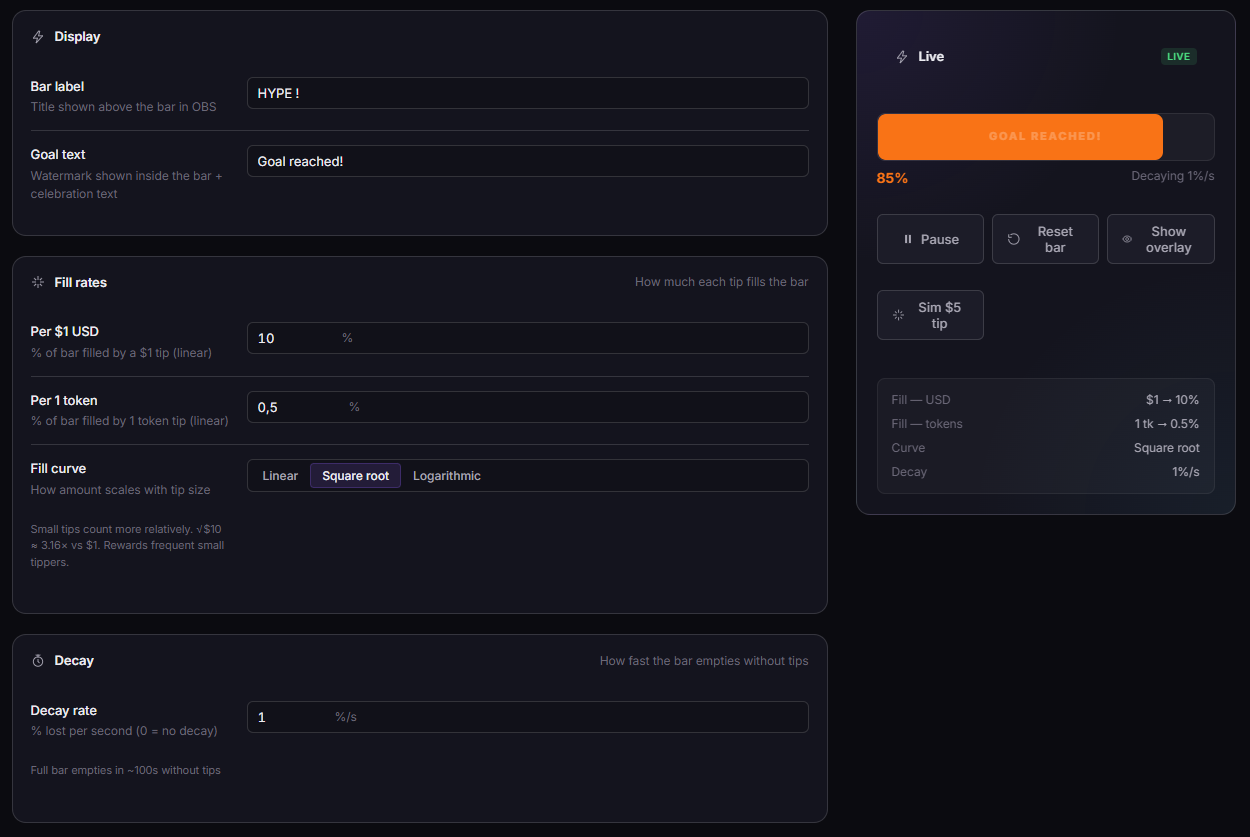
TipDeck Hype Meter — dashboard and settings overview
Hype Meter dashboardFill rate sliders, decay setting, reached celebration config, and live gauge preview.

06FAQ - Hype Meter, answered straight

The questions creators actually ask in our Discord, with straight answers.

What is a Hype Meter for live streams?+

A Hype Meter is an OBS overlay showing a fill gauge from 0 to 100%. Every viewer tip pushes the bar toward 100%. A configurable decay rate drains the bar when tips stop. When the bar hits 100%, the reward you defined unlocks live on screen - a show, a performance, a challenge. The streamer then performs the reward and manually resets the bar to start the next cycle.

The core mechanic is urgency: the bar is always moving, either up on tips or down on decay. Viewers tip not just to be generous, but to prevent the bar from draining below the current level.

Does it work on Chaturbate, Fansly, OnlyFans, Camsoda and Stripchat?+

Yes - all five. TipDeck reads tips from your linked platform chats via a Chrome extension, converts token tips to USD using your configured rate, and feeds every tip into the gauge in real time. From the Hype Meter's perspective, a $10 tip on Fansly and a $10 tip on Chaturbate are identical events.

If you multistream, tips from every active platform aggregate into a single gauge. A $5 tip on Stripchat and a $5 tip on OnlyFans both fill the bar simultaneously - the gauge reflects total activity across all your streams at once.

What does the decay rate do?+

The decay rate drains the gauge automatically every second when no tips are coming in. At decay_rate: 0.3 (%/second), a full gauge empties in 333 seconds - about 5.5 minutes. Quick formula: 100 ÷ decay_rate = seconds to drain from full.

The drain is visible on screen in real time. Viewers can literally watch the bar fall and choose to tip to push it back up. This is what converts casual viewers into active participants - they're not responding to a verbal ask, they're responding to a visual they can't ignore.

Set decay_rate to 0 for a completely static bar. Useful if you want the gauge to accumulate across an entire long stream without resetting, or if you prefer not to apply pressure.

What's the difference between linear, sqrt, and log fill curves?+

All three curves describe how tip amounts translate to gauge fill, but they shape the visual experience differently:

  • Linear - every dollar fills the same percentage. $10 fills twice as much as $5, every time. Most transparent for viewers who want to calculate their contribution.
  • Sqrt (square root) - front-loaded. The first tips fill more than later tips of the same value. The bar visibly rushes at the start of a cycle and slows as it approaches 100%. Triggers first-mover behaviour.
  • Log (logarithmic) - aggressively front-loaded. Strong early burst, then significantly diminishing returns. The bar looks nearly full early on, which builds social proof. The last 20% requires genuine collective effort.

Sqrt and log don't make the bar easier to fill overall - the total amount needed stays the same. They change the pace of filling, which changes viewer psychology throughout the cycle.

What happens when the gauge hits 100%?+

The hype_reached event fires. The overlay shows a celebration effect - a flash, particles, and the reward text displayed prominently. This is visible to everyone watching the stream simultaneously.

The gauge does not auto-reset. It stays at 100% until you manually reset it from the dashboard. This pause is intentional - it gives you time to perform the reward, acknowledge the viewers who contributed, and announce the next reward before the fresh cycle starts.

Can I change the reward without stopping the stream?+

Yes. Update the reward text in the TipDeck dashboard and the overlay refreshes instantly - no OBS source reload, no stream interruption. The new reward label appears on the bar within a second of saving.

Common workflow: announce the new reward verbally while updating it in the dashboard, then reset the gauge. Viewers see the bar go back to zero with the new reward text already showing - clean, fast, no downtime.

How do I set up the Hype Meter for a specific tip target?+

Use the reverse formula: fill_per_dollar = 100 ÷ target_dollars.

  • $30 target → fill_per_dollar: 3.33
  • $50 target → fill_per_dollar: 2
  • $100 target → fill_per_dollar: 1

For token platforms: fill_per_token = 100 ÷ target_tokens. The dashboard shows a real-time preview of the required total as you adjust the sliders, so you don't need to calculate manually.

Is the Hype Meter free?+

TipDeck has a 15-day free trial with full access to every game including the Hype Meter - no credit card required. After the trial it's a flat monthly subscription with no per-tip cut, no usage caps, no upsells. The free trial includes unlimited cycles, all fill curves, and all decay settings.

Turn your next stream into a race your viewers can't stop watching.

The Hype Meter is one of nine TipDeck games. Try them all on the 15-day free trial - no card, no commitment, cancel from the dashboard whenever you want.

No credit card Setup under 5 minutes Cancel anytime