A countdown bar lives at the top of your OBS scene. Every viewer tip adds seconds to the running clock. You set the rate, the cap, and the scaling. When the clock hits zero, the session or action ends - unless someone tips first. The simplest tip mechanic in live streaming, done right.
The TipDeck Timer is a countdown bar that lives in your OBS scene. Every viewer tip adds seconds - your choice how many per dollar or token. The clock runs out, the session ends. Tips keep it alive. Set presets for specific amounts, use diminishing returns to balance whales vs. small tippers, and enable rescue mode as a streamer-only escape hatch if a session runs too long. Works on Fansly, OnlyFans, Chaturbate, Camsoda and Stripchat from a single dashboard.
A countdown bar overlay for OBS where viewer tips are the fuel. The clock counts down. Tips add time. When it hits zero, the show is over - unless someone tips fast enough to keep it going. The deadline is visible to everyone. That visibility is the whole mechanic.
It's the simplest tip-driven game you can run on a live stream, and simplicity is part of why it works. There's nothing to explain to the audience. The bar is counting down. A smaller bar means less time. A tip makes it bigger. Anyone can understand that in two seconds, which means you never lose engagement to confusion.
What makes TipDeck's Timer different from a basic countdown is the set of controls underneath it. You set how many seconds per dollar or per token. You create presets that anchor viewer expectations - "$5 = 3 minutes" is a deal they can evaluate instantly. You choose between linear scaling (every dollar always adds the same amount) or diminishing returns (big tips add less per dollar, so a single whale can't buy a five-hour timer). You enable rescue mode - a streamer-only dashboard button that speeds up the countdown drain if an action is running longer than comfortable, so you can wind down discreetly without cutting the timer abruptly. You set a cap so the session has a predictable ceiling.
Mechanically, it's a browser source. No install required - log into TipDeck, configure the timer, copy the URL, paste into OBS as a Browser Source at 800×100 and position it at the top of your scene. Every tip on every linked platform flows in automatically. The clock updates in real time, in front of everyone watching.
A static session timer tells the audience when you'll stop. A tip-driven timer tells the audience that they control when you stop. That framing change converts passive watchers into stakeholders. Viewers who care about the stream staying on are now incentivised to act, not just watch. The deadline becomes a shared object - something the room can collaborate to extend, or let expire.
Creators use it in two main ways. The first is a session gate: "I go live until the timer runs out" - viewers extend the session by tipping, and when the clock hits zero, that's the natural end. The second is an action gate: "I stay undressed / I stay in costume / this activity continues while the timer is running" - shorter durations, higher engagement per tip, focused on a specific act rather than the whole stream. Both modes use the same overlay and controls; the only difference is the label you put on it and how long you set it.
Six things happen between a viewer's tip and the clock updating. Six steps, every time. Knowing the order - and the logic at each step - lets you calibrate the timer for your audience instead of running on defaults.
Any tip on any linked platform arrives in TipDeck within roughly a second. The viewer's name, the amount, and the platform are captured. Token tips are converted to USD at your configured rate before any further logic runs.
Before any conversion rate logic runs, TipDeck checks whether the tip amount matches a tip preset you've defined. Presets are exact-match rules - "$5.00 exactly → 3 minutes" or "25 tokens exactly → 2 minutes". If a match is found, the preset's second value is added and the rest of the calculation is skipped.
If no preset matches, the conversion rate logic runs instead.
If no preset matched, the tip amount is multiplied by your configured rate (dollars_to_seconds or tokens_to_seconds).
In linear mode: a $10 tip always adds exactly 2× what a $5 tip adds. Simple, predictable, easy to communicate.
In diminishing returns mode: the seconds added per dollar decrease as tip size grows. A $50 tip adds more than a $5 tip, but not 10× more. There's a formula-based cap (default 30 minutes per single tip). This prevents a single large tip from creating a multi-hour session, keeps smaller tips feeling meaningful throughout, and distributes the impact more evenly across your audience.
The calculated seconds are added to whatever remains on the clock. If the timer cap is configured and the new total would exceed it, the clock is set to the cap value instead - it never shows more than the maximum. The bar overlay updates instantly: the new time is visible to the whole stream within a second of the tip arriving.
The bar empties. The overlay stays visible for the configured auto-hide delay (you can set this to anything from immediate to several minutes). If no tip arrives before auto-hide triggers, the overlay disappears from the scene. If a tip arrives, the clock restarts from the new total and the overlay stays visible.
If you enabled rescue mode in the dashboard, a button becomes available exclusively in your streamer interface. When an action is running longer than comfortable, clicking rescue makes the countdown drain faster - ×1.1, ×1.2, or ×1.5 the normal rate depending on your setting.
This is a discreet exit tool: the timer reaches zero naturally, at your pace, without a jarring cut. Viewers just see the bar counting down a bit faster - they have no indication rescue mode is active. Only you can trigger it.
Two minutes of the Timer in action: tips arrive, seconds are added, rescue mode kicks in, the clock is saved. The fastest way to understand how each feature interacts is to watch one full countdown cycle from outside the dashboard.
Once the video drops, the player above swaps to the embedded clip - same frame, same dimensions, no layout shift.
We're not going to give you a fabricated uplift number. What we'll give you is the precise mechanism: why a visible countdown changes what viewers do with their money. Six reasons, all structural.
A visible deadline activates loss aversion - the psychological reality that people work harder to avoid losing something than to gain something equivalent. A bar that's draining is more motivating than an abstract "tip to support the stream." The viewer can see exactly how much time is left and calculate what it costs to extend it. That legibility converts watching into action.
When a viewer tips on a regular stream, they're giving. When they tip on a Timer stream, they're buying time. The transaction has a concrete outcome - the clock goes up, visibly, immediately. That tangible cause-and-effect is more satisfying than a donation that disappears into the background. Viewers tip more when they can see what they're getting.
Every session with rescue mode has a built-in climax: the moment the bar drops into the danger zone and tips become worth more. That structural moment is something the streamer can lean into vocally, and viewers who have been watching without tipping often make their first tip during it. Urgency plus increased value is a powerful combination at the end of a session.
In a linear model, a single $100 tip adds 10× as much time as ten $10 tips. That dynamic can discourage small tippers - why bother if one whale can do it all? Diminishing returns flattens that ratio. Small tips stay relevant throughout the session because the ceiling on any single tip's contribution is capped. More viewers participate, and the session's sustainability doesn't depend on one person.
"$5 = 3 minutes" is a deal. A deal is easier to act on than a rate. When viewers know exactly what a specific tip amount buys, the decision to tip is simple arithmetic - and simple arithmetic gets made faster. Anchored expectations also reduce the mental load of watching a tip mechanic for the first time. The viewer doesn't need to figure out the conversion; they just see the deal.
Streams have dead spots. Low chat, slow energy, the streamer running out of material. A countdown bar in the corner is always something to look at and talk about - "we have 12 minutes left" is a topic that needs no setup. The Timer is ambient but active: it's always communicating the state of the session without the streamer having to say anything.
One pass through the dashboard, one paste into OBS. Below is every setting you'll touch, what it does, and how to calibrate it for your audience.
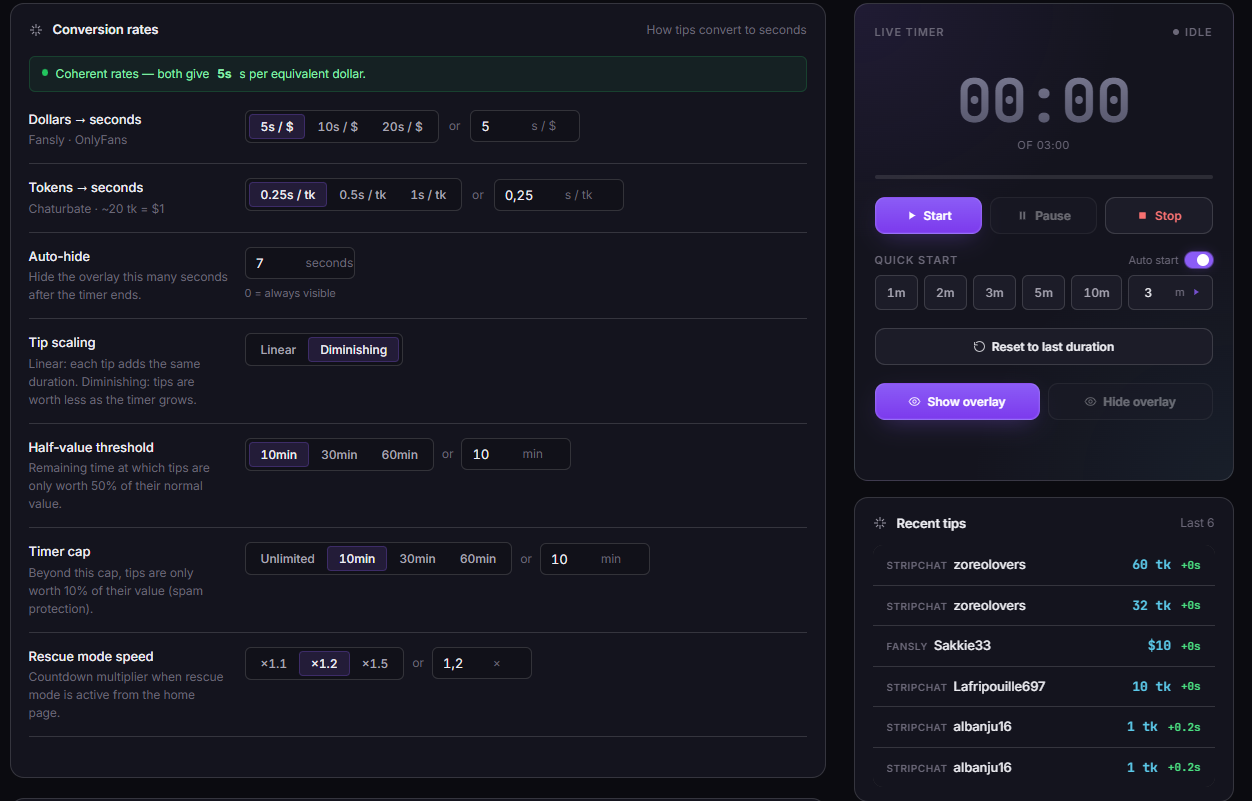
Two rate fields cover both currency modes:
If you run both currencies, the rates are independent - a token tip and a USD tip each use their own rate. The dashboard shows you the coherence check: at current rates, is a token equivalent to its USD value in time? If not, it flags the discrepancy so you can align them if you want consistent value across platforms.
Fixed override rules. Each preset has an amount and a seconds value. When a tip matches the amount exactly, the preset fires - the conversion rate is bypassed entirely. Examples:
Presets are checked first, before any conversion rate logic. Behavior depends on the timer state: if the timer is activated but not yet running, a matching tip starts the countdown at the preset duration. If the timer is already running, the preset acts as a minimum guarantee - if the remaining time plus what the rate would add is less than the preset seconds, the clock is set to the preset value; otherwise the normal rate addition applies. You can have as many presets as you want. Keep the most visible ones at round minute values - "3 minutes" is more legible than "187 seconds".
Tip presets are shared with the Menu. A Menu item can reference a tip preset: when a viewer tips that amount, both the action label appears in the Menu queue and the timer starts at the preset duration. The two tools are designed to work together.
Linear: straightforward multiplication. $10 adds 2× the seconds of $5. Predictable and easy to communicate. Works best for audiences that tip small amounts consistently.
Diminishing returns: the seconds added per dollar decreases as tip size grows. There's a configurable per-tip cap (default 30 minutes). A $100 tip won't add 17× more time than a $6 tip - the relationship tapers. Prevents any single whale from determining the session length alone, and keeps small tips meaningful throughout.
Enable rescue mode and choose a multiplier: ×1.1, ×1.2, or ×1.5. When the clock falls below 15% of its current maximum, rescue mode activates and every incoming tip has its seconds multiplied by that factor before being added. The multiplier is shown in the overlay, signalling to viewers that now is a better time to tip than before.
The 15% threshold is fixed - it's not configurable. The multiplier is. Start with ×1.2 if you're unsure; ×1.5 is noticeable enough to mention on-stream.
An optional ceiling on the clock. Tips will not push the timer above the cap value. Useful for sessions where you want a predictable maximum length - "I'm live until the timer runs out but not past 2 hours" is a credible commitment when the cap is set. Also protects against tip-stacking at the start of a stream that would effectively disable the mechanic.
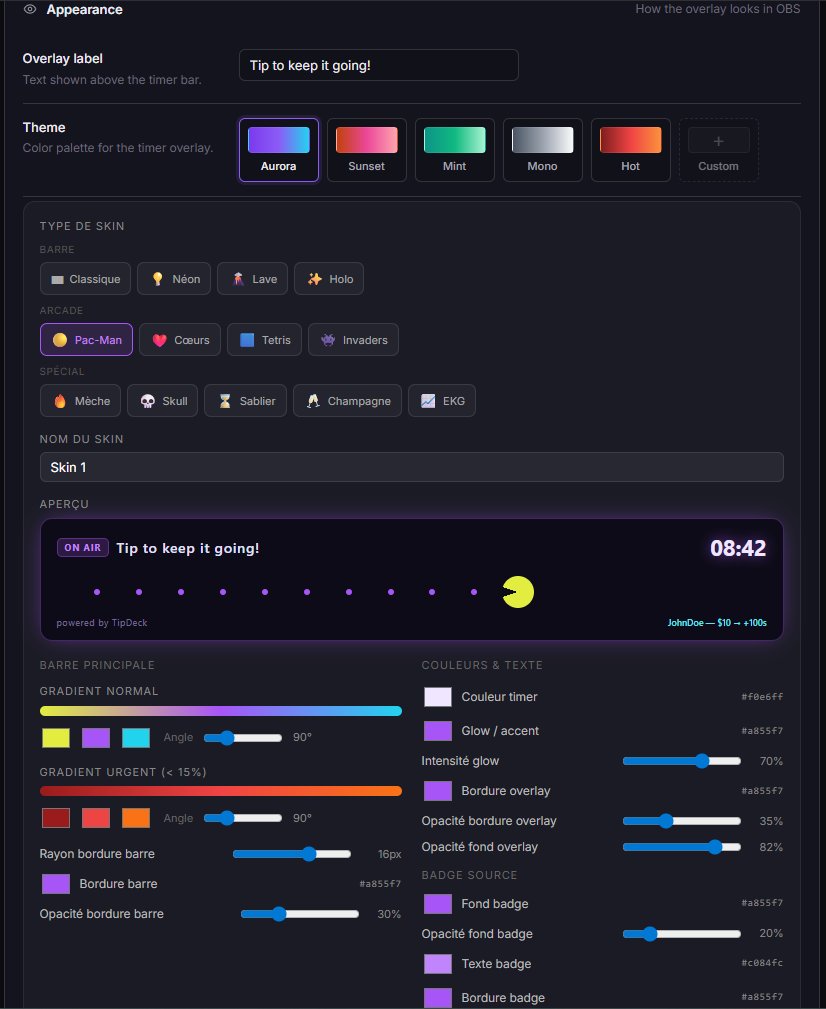
The Timer ships with several themes to change the bar's colour palette, gradient, and typography. But the most powerful option is the SkinBuilder:
The SkinBuilder lets you create a fully custom look with hex colors, gradient stops, and glow effects. Popular skins: Neon (neon glow on dark), Pacman (retro pixel art, the bar "eats" time), Pixel / Tetris / Invaders (retro gaming aesthetics), Lava / Fuse (thermal orange-red effects), Skull / Hourglass / Champagne / Heartbeat (thematic icons), Holo (iridescent gradient). The overlay label and tipper username display are both toggleable. Live preview in the dashboard.
The Timer is a 800×100 bar - designed to sit at the top edge of a 1920×1080 scene:
The questions creators actually ask in our Discord, with straight answers.
A countdown timer overlay is an OBS browser source that displays a running clock on your live stream. Every viewer tip adds seconds to the clock based on your configured conversion rate or tip presets. When the timer hits zero, the session ends. The audience keeps it alive by tipping - or lets it expire. The bar is visible to all viewers simultaneously, which makes the remaining time a shared stake in the session.
Yes - all five. TipDeck reads tips from your linked chats via a Chrome extension, converts token tips to USD at your configured rate, and feeds the amount to the Timer. A $5 tip from Chaturbate and a $5 tip from Fansly are treated identically by the conversion logic.
If you multistream across multiple platforms, tips from all active platforms feed the same timer. The clock doesn't care which platform a tip came from.
In linear mode, every dollar always adds the same number of seconds. A $50 tip adds exactly 10× what a $5 tip adds. Simple to explain, predictable to viewers.
In diminishing returns mode, the seconds per dollar decrease as tip size grows, up to a configurable cap (default 30 minutes per single tip). A $50 tip adds more than a $5 tip, but not 10× more. This prevents a single large tip from buying a multi-hour session, keeps smaller tips relevant and meaningful throughout, and distributes the timer's sustainability across the audience rather than concentrating it in one whale.
Tip presets are exact-match override rules. If a tip amount matches a preset exactly, the preset's second value is added to the clock instead of the conversion rate calculation. Example: if you set "$5 exactly = 3 minutes", any $5 tip triggers that preset and adds 180 seconds - regardless of what your dollars_to_seconds rate would have calculated.
Presets are checked before any conversion rate logic. They're useful for anchoring viewer expectations at common tip amounts: the viewer knows the deal, the decision is fast.
Rescue mode activates when the timer drops below 15% of its current maximum. Any tip arriving in that window gets its seconds multiplied by the configured factor - ×1.1, ×1.2, or ×1.5. A small tip in the last few minutes is worth more than the same tip at the start.
This creates a structural climax at the end of every session: the visual urgency of a nearly-empty bar plus the mechanical fact that tips are more valuable now. Viewers who have been watching without tipping often make their first tip during rescue mode - the combination of urgency and increased value is the strongest tipping prompt of the whole stream.
The clock stops at zero. The overlay remains visible for the configured auto-hide delay. If no tip arrives before that delay expires, the overlay hides itself automatically - no manual scene switch needed from OBS. If a tip arrives before the delay expires, the clock restarts from the new total and the session continues.
Yes. The timer cap setting defines a ceiling. Tips will never push the clock above that value. If the accumulated seconds from a tip would exceed the cap, the clock is set to the cap value instead.
This is useful for keeping sessions to a predictable length - "I'll go until the timer runs out, max 2 hours" is a credible commitment when the cap is set. It also prevents early tip-stacking from effectively disabling the mechanic for the rest of the stream.
TipDeck has a 15-day free trial with full access to every game, including the Timer - no credit card required. After the trial it's a flat monthly subscription with no per-tip cut, no usage caps, no upsells.
The Timer is one of nine TipDeck games. Try them all on the 15-day free trial - no card, no commitment, cancel from the dashboard whenever you want.