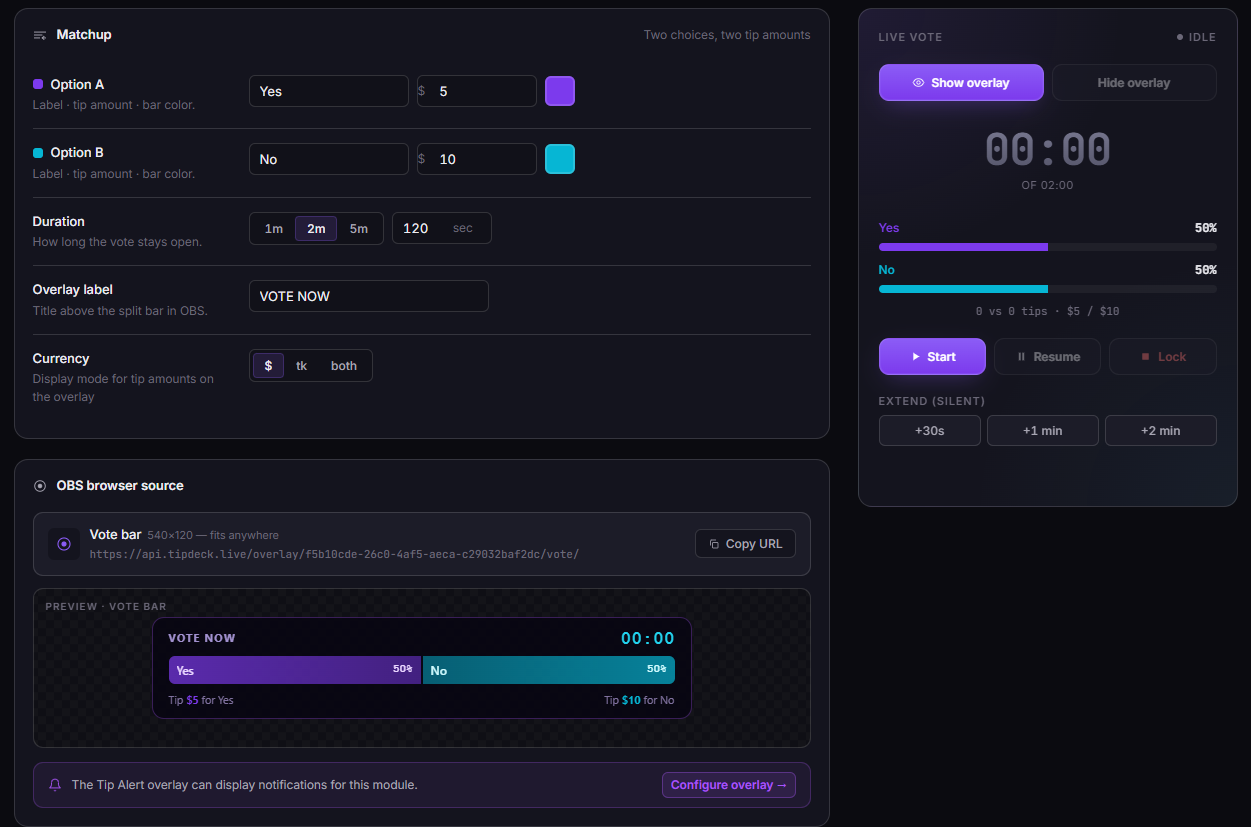
Define two options. Assign a tip amount to each. Drop the overlay into OBS. The countdown starts, viewers tip to vote, and the split bar shifts in real time - live, on screen, in front of everyone. The simplest poll mechanic in streaming, made competitive by real money.
The TipDeck Vote is a live two-option poll where viewers vote by tipping. Define two choices, assign a tip amount to each, and the split bar updates in real time for the whole stream to see. A countdown runs, both sides compete, and viewers tip to push their preferred option ahead. Works on Fansly, OnlyFans, Chaturbate, Camsoda and Stripchat from a single dashboard.
A real-time split bar that puts two options in front of your audience and lets them decide - with actual money. Every qualifying tip moves the bar. The whole room watches. The countdown ends. You follow through.
The mechanic is deliberately simple: two options, two tip amounts, one split bar. Option A has a label (say, "SHAVE") and a tip amount (say, 5 tokens / $0.31). Option B has a different label ("NOT SHAVE") and a different tip amount (6 tokens / $0.38). When a viewer tips exactly 5 tokens, their vote registers for SHAVE. When someone tips 6 tokens, it registers for NOT SHAVE. Any other tip amount is a regular tip - it shows up in chat, but the bar doesn't move. The low token amounts keep the barrier to entry minimal - everyone can participate.
What makes it interesting isn't the simplicity - it's what simplicity does to the room. When the bar sits at 50/50 with two minutes left, every viewer who cares about the outcome tips. When one side is at 70%, viewers on the losing side tip to close the gap. The bar is a live scoreboard that tells the story of the vote in real time, and viewers compete to shape that story. The split bar is not decorative - it's the game.
A classic use case: Option A "SHAVE" · 5 tokens ($0.31) vs Option B "NOT SHAVE" · 6 tokens ($0.38). At a conversion rate of $0.0625/token, these are very low amounts - barrier to entry is near-zero, which maximises participation. Everyone in the room can afford to vote; the bar moves fast; the drama is real. The asymmetry (5 vs 6 tokens) makes SHAVE the slightly cheaper vote, which can influence which side builds momentum first.
Chat polls are free. Viewers type "A" or "B" with zero friction, zero investment. The results reflect nothing about how much viewers actually care. A viewer who types "A" in chat and a viewer who would pay $3 to vote A are two completely different signals.
A TipDeck Vote captures the second kind of signal. Every vote has a cost, so every vote is a statement of genuine preference. The viewer who tips $3 for DANCE wants DANCE more than they want $3. That changes the weight of the result - and more importantly, it changes the energy of the countdown. A tipped vote isn't just data; it's a financial commitment. The streamer and the whole room know it.
Vote works best when the two options are genuinely different and viewers have a clear preference. Outfit choice, activity selection, music pick, challenge decision - any binary with real stakes on both sides. The worst vote is one where 90% of the room prefers one outcome before the countdown even starts: there's no competition, no drama, no reason to tip. Set up the options so both sides have fans in the room, and the bar does the rest.
You can run multiple votes per stream. A vote at the start to set the tone, a vote mid-stream when energy dips, a vote near the end as a finale mechanic. Each vote resets the bar to 0/0 - no carryover from the previous one.
Six things happen from vote setup to streamer delivering the result. Six steps, every time. Knowing them turns the Vote from a simple poll into a tool you can time, extend, and close strategically.
In the dashboard, you set Option A and Option B. Each gets a label (shown on the bar - keep it under 8 characters for clean readability at 800px wide), a tip_amount in USD or tokens, and an accent color. The two tip amounts must be different; identical amounts would make it impossible to assign a vote to a side.
Hit Start in the dashboard. The overlay transitions from idle to active: the split bar appears, the countdown timer shows the remaining time, and the tip instructions appear below the bar - "Tip $3 for DANCE | Tip $5 for STORY". Viewers know exactly what to tip and what it does.
Any tip that exactly matches Option A's configured amount - on any linked platform - registers as a vote for A. The bar updates within a second: A's side widens, B's side narrows, the percentage labels refresh. The tipper's name appears in the tip feed below the bar. One vote, one bar shift, instant visibility.
Same logic, opposite direction. Every qualifying B-tip pushes B's percentage up. Near-tied contests are the most dramatic because every single vote changes the outcome visibly. When the bar oscillates near 50/50 in the final minute, the room locks in.
A $10 tip during a $3 vs $5 vote doesn't count for either side. It shows up as a regular tip in your platform chat and in the tip feed - you see it, you can acknowledge it - but the split bar stays where it is. Vote uses exact-match comparison (with a $0.01 tolerance for token conversions). No rounding, no "closest option" logic.
When the timer hits zero, or when the streamer hits Stop early, the final split freezes on the bar. The winning side is highlighted. The streamer reads the result and delivers the outcome that was on the table. Like the Wheel, the Vote is only as good as your follow-through - the room watched the whole contest and knows who won.
Controls available throughout: Pause (freezes the countdown, bar stays visible), Resume (restarts from where it was), Extend (+30s / +60s / custom seconds), Stop early (ends immediately with current results).
Sixty seconds of a full vote cycle: options set, countdown running, bar shifting as tips arrive, final result locked. The fastest way to understand the mechanic is to watch it resolve in real time.
Once the video drops, the player above swaps to the embedded clip - same frame, same dimensions, no layout shift.
No fake engagement numbers. Here is the precise mechanism - six behavioural reasons why a split-bar vote drives tips that a free chat poll never could.
The moment a viewer tips and sees their percentage tick upward, they are invested in the outcome. They want their side to win - not abstractly, but financially. That personal stake turns a passive watcher into an active participant who checks the bar every few seconds and tips again if the lead slips. One tip creates the psychology; the bar sustains it.
Two sides competing on a visible bar is one of the oldest engagement mechanisms in sport. Viewers don't tip once and walk away - they watch the bar. If their side starts losing, they tip again. If their side is winning, viewers on the losing side tip to close the gap. The bar itself is the incentive. It doesn't require the streamer to do anything except let it run.
The last 30 seconds of a close vote are reliably the most active. Viewers who've been watching without tipping suddenly tip to influence the final result. The countdown is a natural urgency mechanism - it doesn't require the streamer to create urgency manually. Set a duration, let the timer create the pressure.
When a vote is close at the end of the timer, extending by 30 or 60 seconds resets the urgency cycle. The room has already been primed - they're watching, they're invested, they have money in. An extension says "it's not over yet" and both sides scramble to close the gap or protect the lead. Extensions are one of the most effective tip amplifiers in the Vote toolkit.
The Vote's low-entry option means lurkers and low-budget viewers can participate without a large commitment. A viewer who tips $3 in a close contest contributes meaningfully - their vote can flip the result. Accessibility at the low end maximises total participation; high-budget viewers who want to dominate their side tip multiple times. Both behaviours drive tips.
A vote running in the banner bar doesn't require the streamer to narrate it constantly. The bar tells the story. Viewers who enter mid-stream immediately see the contest, understand the stakes, and can join. The streamer can react to bar shifts as they happen - "STORY just closed the gap, three minutes left" - without having to manage anything. The overlay creates commentary material; the streamer delivers it.
The Vote has fewer moving parts than any other TipDeck game. Two options, a timer, and a Start button. Below is every setting and what it does - the full reference for when you want to tweak a running vote or set up a new one fast.
Each option has three fields: label (displayed on the split bar - keep it under 8 characters for clean readability at 800px), tip_amount (the exact tip that registers as a vote), and color (the bar's accent color for that side). The two tip amounts must be different - identical amounts would make it impossible to assign a vote to a side.
You can also set a currency per option - USD or tokens - independently. Option A can be "50 tokens" while Option B is "$5 USD" if your platform mix warrants it.
Set the initial duration in seconds (30 to 3600). Typical votes run 3–10 minutes. Short votes create urgency but reduce total tips; longer votes give viewers more chances to join but can drag. Extend options available mid-vote: +30s, +60s, or a custom number of seconds. Each extension resets the urgency cycle and is reflected instantly on the overlay countdown.
Each option's tip_amount can be denominated in USD or tokens. TipDeck normalises token amounts to USD using your configured token rate before comparison. Set the currency that matches how your audience thinks about tips on the platform where the vote is running.
The dashboard vote panel shows five controls in sequence:
The Vote overlay is designed as a banner bar, not a full-scene overlay:
The questions creators actually ask in our Discord, with straight answers.
A live vote overlay is an OBS browser source that shows a real-time split bar between two options. Viewers vote by tipping the exact assigned amount - not by typing in chat, not by clicking a button, but with an actual tip. The bar updates instantly, the whole room sees the split, and the countdown runs out to a result the streamer has agreed to follow through on.
The difference from a free chat poll: every vote has a cost. That cost is what makes the result meaningful and the competition real.
Yes - all five. TipDeck reads tips from your linked platforms via a Chrome extension, normalises amounts to USD (token tips use your configured rate), and routes them to the active vote. An exact-match tip on any linked platform registers as a vote, regardless of which platform fired it.
If you multistream, votes aggregate across all platforms simultaneously. A viewer on Fansly and a viewer on Chaturbate tipping the same option both move the same bar.
It registers as a normal tip but does not move the split bar. Vote uses exact-match comparison (with a $0.01 tolerance for token conversions). A $4 tip during a $3 vs $5 vote appears in your tip feed and platform chat as usual - it just doesn't count as a vote for either side.
This is intentional. Approximate matching would let viewers accidentally vote with adjacent amounts, or deliberately skew the vote. Exact-match keeps the mechanic clean: viewers know what each amount does, no exceptions.
Yes. The dashboard controls include +30s, +60s, and a custom seconds extend button, all available while the vote is running or paused. You can extend multiple times. The new deadline appears on the overlay countdown instantly - no OBS reload needed.
Extensions are most powerful when a vote is close near the end. The room is already primed and invested; an extension resets the urgency and typically generates a burst of late tips from both sides.
No. Vote is a binary A vs B mechanic by design. The split bar only makes visual and competitive sense with two sides - a three-way split defuses the rivalry dynamic that drives tips.
For multi-option scenarios, consider the Lucky Number game (viewers tip specific amounts to claim numbered squares) or a custom tip menu. These handle larger option sets better than a split bar can.
There is no enforced minimum - you set the amounts yourself. Practically, $1–$3 for the cheaper option creates high participation volume. Very low amounts can make the bar shift so often that individual votes feel inconsequential; very high amounts reduce total vote count but increase revenue per vote.
The sweet spot for most streams: Option A at $3–$5, Option B at $5–$10. Enough friction to make votes meaningful, low enough that a large portion of your active viewers can participate.
The split bar and the winner are determined by vote count - each qualifying tip counts as one vote, regardless of amount. If Option A is $3 and Option B is $5, a viewer tipping $5 doesn't get more votes than a viewer tipping $3; they each get one vote.
Monetary totals are displayed in the result panel as context but don't determine the winner. Vote count wins. This keeps the mechanic fair: a high-budget viewer tipping $5 on B has the same vote weight as a $3 tip on A.
TipDeck has a 15-day free trial with full access to every game including Vote - no credit card required. After the trial it's a flat monthly subscription with no per-tip cut, no usage caps, no upsells.
Vote is one of nine TipDeck games. Try them all on the 15-day free trial - no card, no commitment, cancel from the dashboard whenever you want.